
Free PDF conversion and file processing tools to simplify your document workflow.
Information
🌐 Windows • macOS • Linux • Android • iPhone
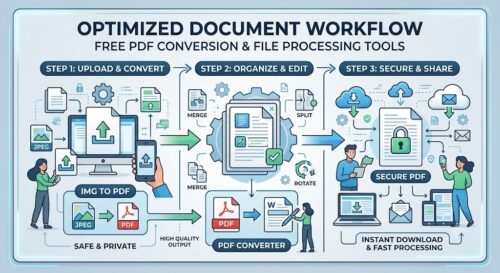
How to Use Workflow Tools
Choose the workflow tool you need, upload your file, and let ProKitBag handle the rest. Whether you’re converting images into PDF documents or transforming PDF files into different formats, the process is quick, secure, and requires only a few clicks. Download your processed file instantly without any complicated steps.
How it works
Why Choose ProKitBag?
- ✅ 100% Free Online Tools
- ✅ Fast File Processing
- ✅ No Registration Required
- ✅ Secure File Handling
- ✅ Works on Mobile & Desktop
- ✅ High-Quality Output
- ✅ User-Friendly Interface
- ✅ Trusted Productivity Tools
What others are saying
“Merging PDF files has never been easier. I uploaded my documents, clicked Merge, and downloaded the combined PDF in seconds. Fast, simple, and hassle-free!”
“ProKitBag makes merging PDF files effortless. It’s fast, secure, free to use, and delivers high-quality results every time. Highly recommended!”
Frequently Asked Questions (FAQs)
What are Workflow tools?
Workflow tools help automate common document tasks such as converting images into PDFs or changing file formats, saving time and improving productivity.
Are these tools free?
Yes. Every Workflow tool on ProKitBag is completely free to use.
Is my data secure?
Absolutely. Your uploaded files are processed securely, and we do not permanently store your documents.
Can I use these tools on my phone?
Yes. All Workflow tools work seamlessly on Android, iPhone, tablets, and desktop browsers.
Will my document formatting remain the same?
Yes, the tool preserves the original formatting as much as possible.