
PDF Security – Protect Your PDF Files Online for Free
Keep your documents safe with our PDF Security tool. Whether you’re sharing business contracts, financial reports, legal documents, or personal files, protecting sensitive information is essential. Our free online PDF security solution helps you secure your PDFs quickly without installing any software or creating an account.
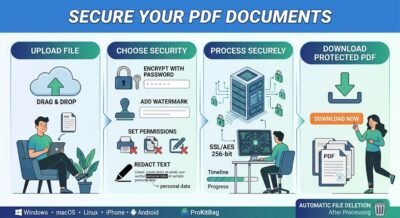
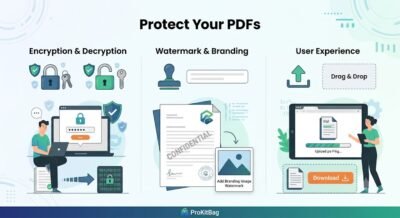
With this tool, you can encrypt PDF files using a strong password to prevent unauthorized access and keep confidential information private. If you need to access a protected document that you own, you can also decrypt PDF files by removing password protection with the correct authorization. For additional document protection, you can add a watermark to display your brand, copyright notice, or confidential label. If necessary, our tool also allows you to remove watermarks from authorized documents while preserving the original quality.
Need to protect sensitive information before sharing? Use the Redact PDF feature to permanently remove confidential text, personal data, or private information. You can also remove JavaScript embedded in PDF files to improve document security and reduce potential risks when opening files.
Our PDF Security tool works directly in your web browser on Windows, macOS, Linux, Android, and iPhone. Files are transferred over secure connections and automatically deleted after processing to protect your privacy. Upload your PDF, choose the required security option, and download a protected, high-quality document in just a few clicks—fast, secure, and completely free.
Information
Windows • macOS • Linux • iPhone • Android
AES 256-bit Encryption
How to Secure PDF Files
Upload or drag and drop the PDF files you want to protect. Choose your security settings, set a strong password if needed, and start the process. Within seconds, your secured PDF will be ready to download.
Custom Security Permissions
Control how others interact with your PDF documents. Restrict printing, copying, editing, commenting, or form filling to keep your files protected while allowing authorized access.
Fast and Easy to Use
Our PDF Security tool is designed for everyone. Simply upload your file, select the desired security options, and secure your PDF in just a few clicks—no technical knowledge required.
Works on Any Device
Protect PDF files from any device using your favorite browser. The tool is fully compatible with Windows, macOS, Linux, Android, and iPhone without requiring additional software.
No Software Installation
Everything works online, so there’s nothing to install or update. Access the PDF Security tool anytime from anywhere and secure your documents instantly.
Privacy and Security First
Your privacy is our priority. Files are transferred over encrypted connections, processed securely, and automatically deleted from our servers after a short time to ensure your documents remain confidential.
What Others Are Saying
“The PDF Security tool made it incredibly easy to protect my documents with strong encryption. It was fast, secure, and required no software installation.”
“I was able to encrypt my PDF, set custom permissions, prevent printing and editing, and securely share my files in just a few clicks.”
Frequently Asked Questions (FAQs)
1. What is a PDF Security tool?
A PDF Security tool helps protect your PDF files by adding passwords, encryption, permissions, watermarks, and other security features to keep your documents safe.
2. How do I secure a PDF online?
Upload your PDF, choose the security option you need, configure the settings, and click the secure button. Your protected PDF will be ready to download in seconds.
3. Can I password-protect a PDF?
Yes. You can encrypt your PDF with a strong password to prevent unauthorized users from opening or viewing the document.
4. Can I restrict printing, copying, or editing?
Yes. You can set permissions to prevent printing, copying text, editing content, or modifying the PDF while still allowing authorized viewing.
5. Is my uploaded PDF secure?
Yes. Your files are transferred over encrypted connections, processed securely, and automatically deleted from our servers after a short period.
6. Do I need to install any software?
No. The PDF Security tool works entirely in your web browser, so no software installation or registration is required.
7. Does the tool work on mobile devices?
Yes. It works on Windows, macOS, Linux, Android, and iPhone using any modern web browser.
8. Will the original formatting of my PDF change?
No. The tool preserves your document’s layout, fonts, images, and formatting while applying the selected security settings.
9. Can I remove security from a PDF?
Yes, if you have the proper authorization or password, you can remove password protection or restrictions from your own PDF documents.
10. Is the PDF Security tool free to use?
Yes. You can use the PDF Security tool online for free without creating an account or paying any subscription fees.
Share Our PDF Security Tool
Help others protect their documents with our fast, secure, and free PDF Security Tool.
Share this tool with your friends, colleagues, students, or team members, or feature it on your blog, website, forum, or social media to help more people encrypt, protect, and secure PDF files online—completely free.
Related Tools
- Unlock PDF
- PDF Security
- Encrypt PDF
- Decrypt PDF
- Add Watermark
- Remove Watermark
- Redact PDF
- Remove JavaScript